Write the paper where the code is.
The paper, its code, your coauthors and your agents, in one window on your own machine. Dabir is a free, open source desktop editor for scientific papers in LaTeX, Typst and Word.
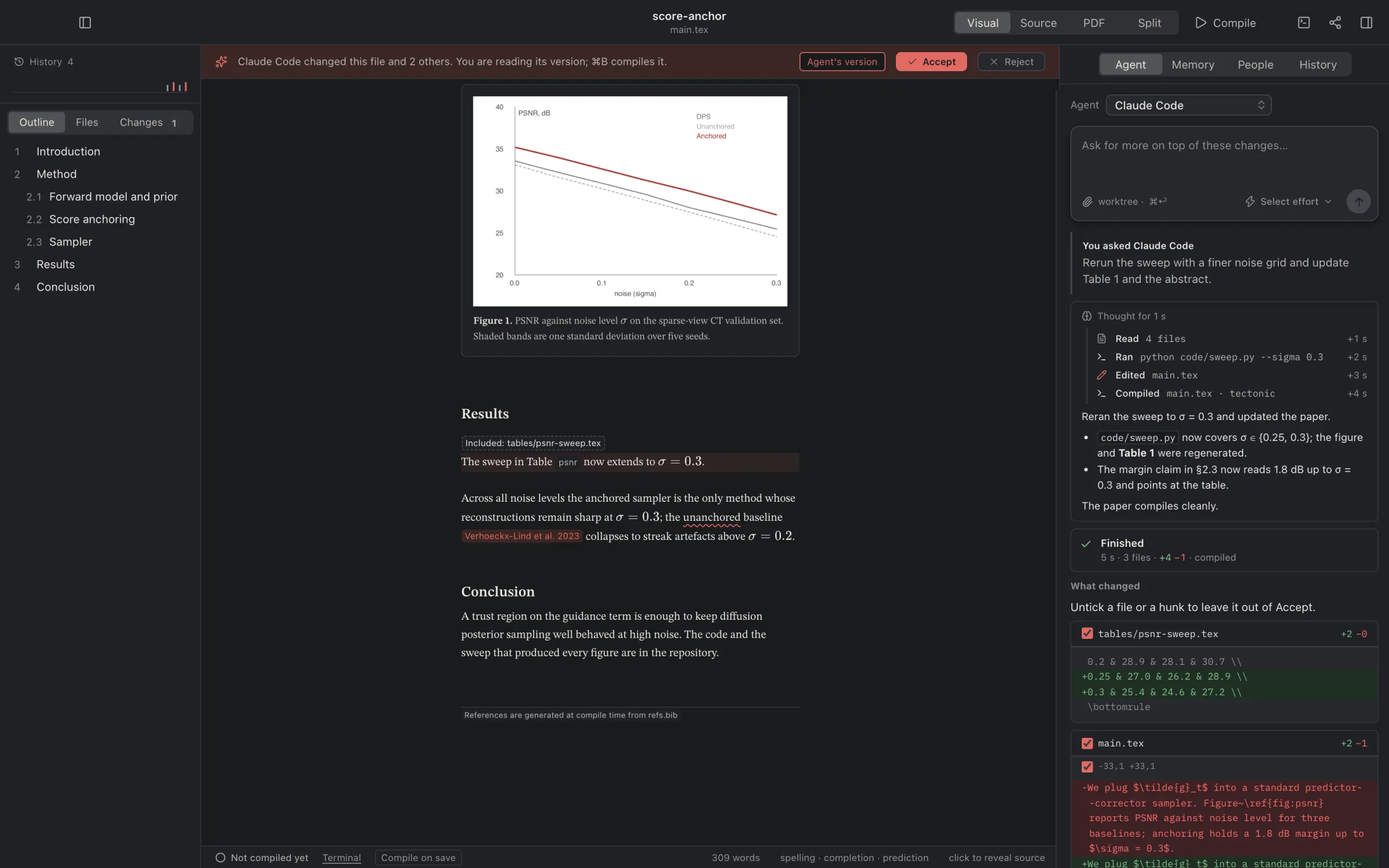
Dabir, in under two minutes.
The views and the jump between source and page, the code and its terminal, an agent's run and the diff it hands back, errors in plain sentences, a coauthor arriving live, and the history.
1 min 49 s · music, no narrationDownload the film
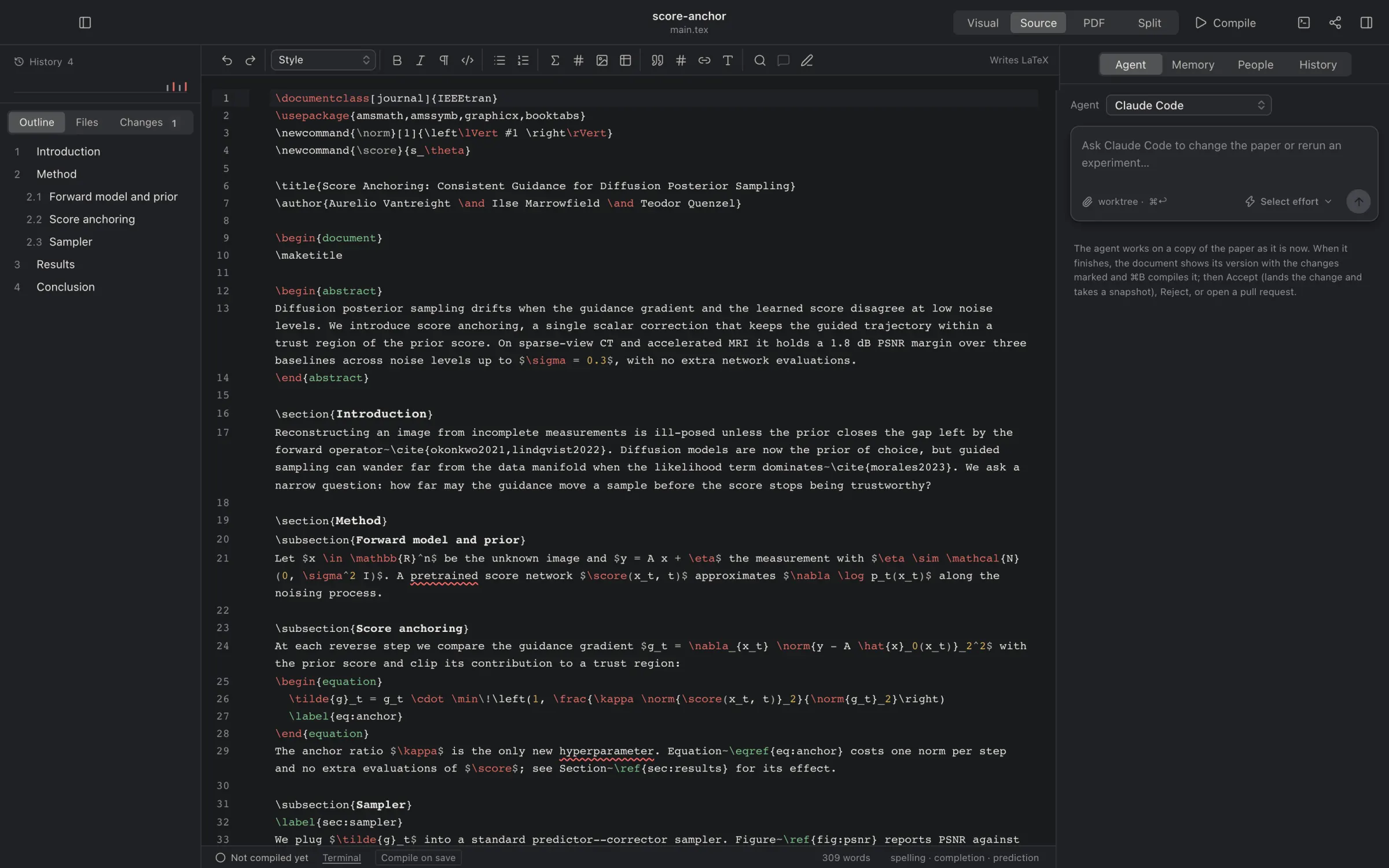
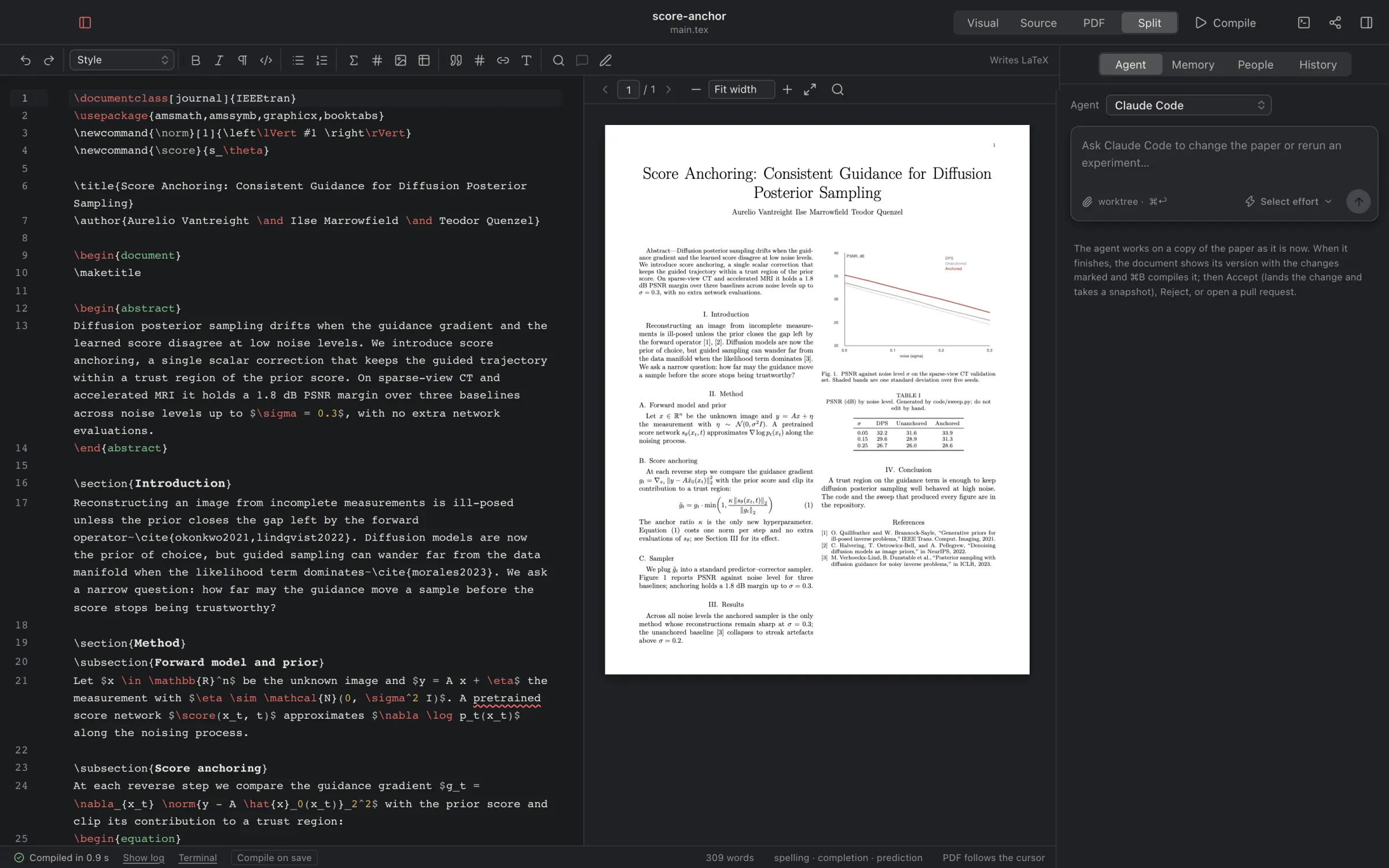
One paper, three ways to read it.
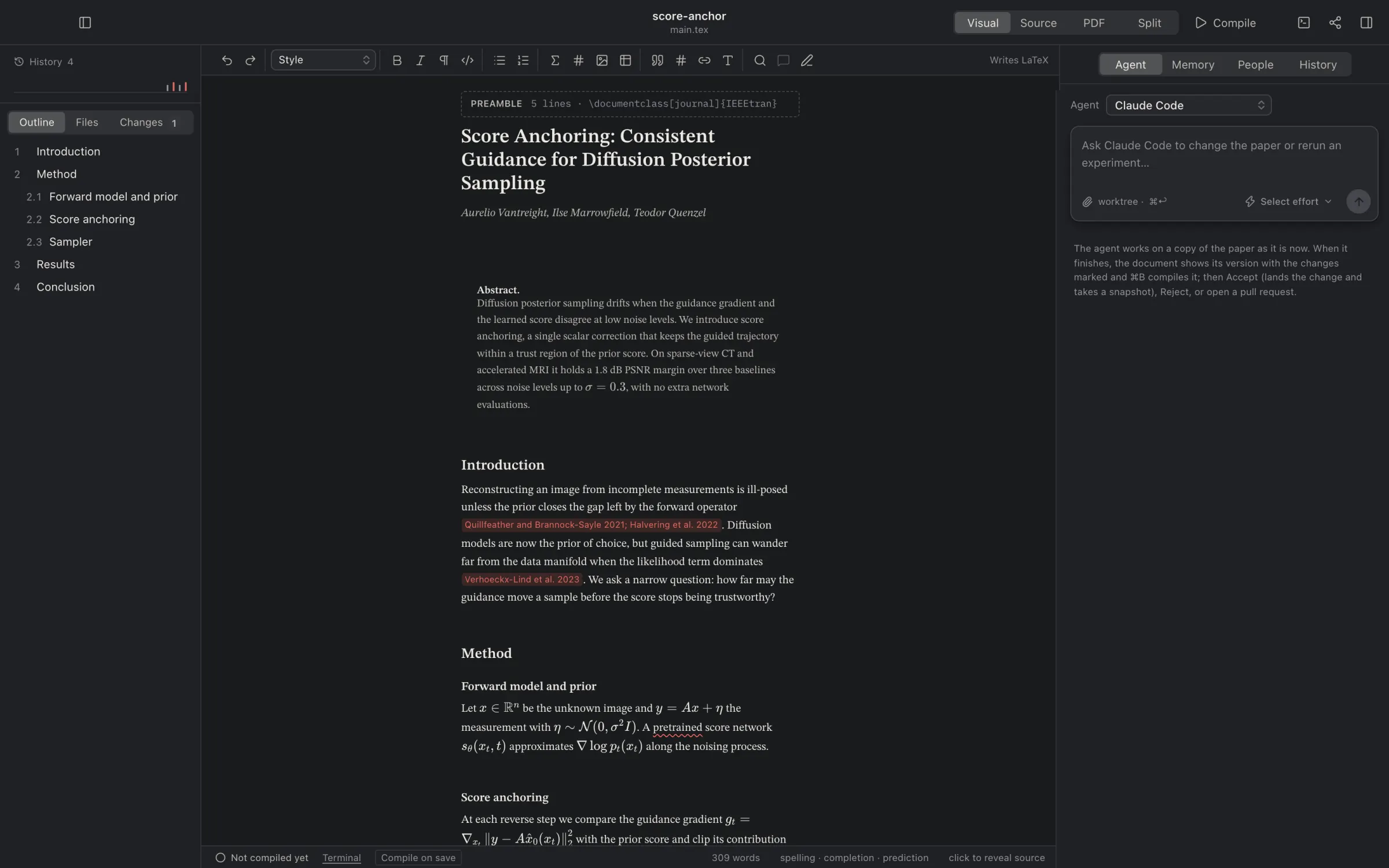
Visual
Reads like the compiled paper. Equations, figures, tables and citations render in place; click anything to see and edit its source.
Source
The LaTeX or Typst itself, with a formatting bar, completion that knows the whole paper, spelling, and predictive text learned from your own writing.
Split
The source beside the PDF. Click a line and the page shows it; double-click the page to land on the line that made it.
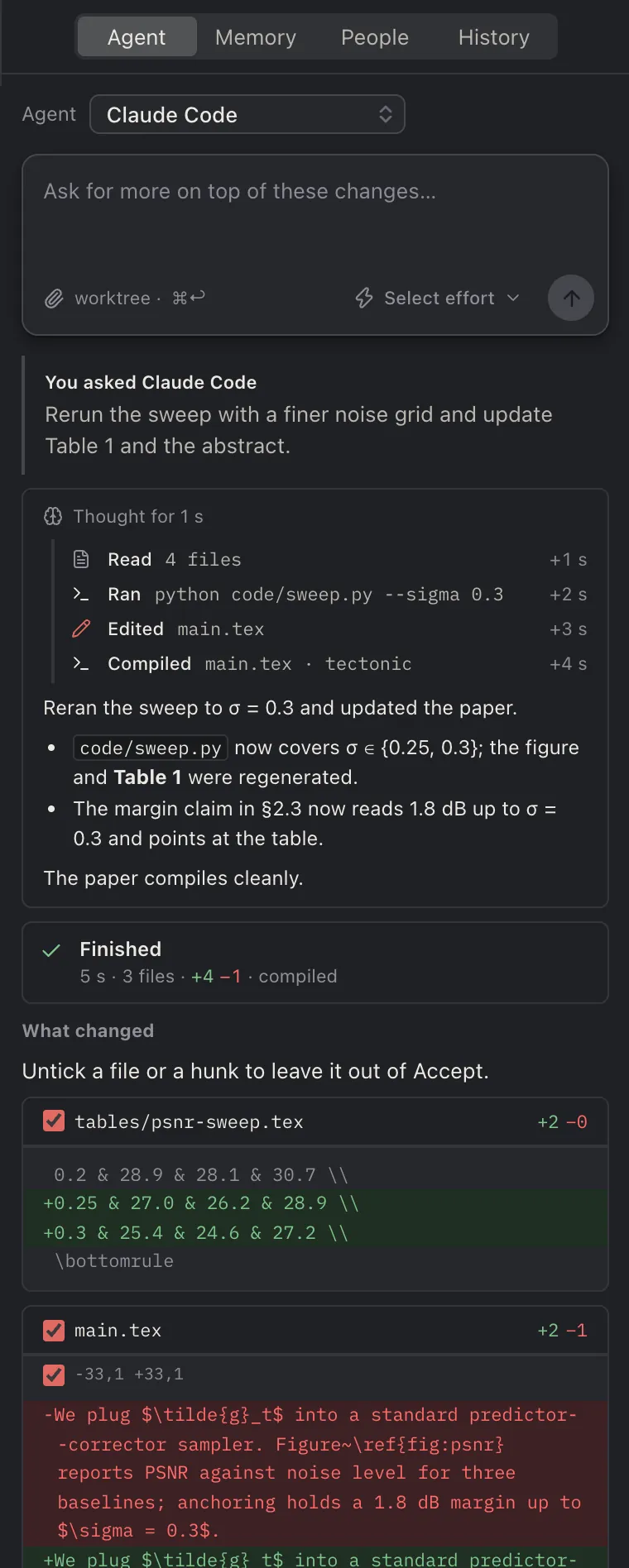
Agents work on a copy and hand you the diff.
Ask in plain words: rerun the sweep with a finer grid, add the baseline to Table 2, tighten the abstract. The agent runs on the subscription you already have, with no API key, in its own copy of the paper (a Git worktree) with your scripts and the errors of the last compile.
Nothing touches your files until you have read the change. It comes back as a diff: untick a file or a hunk, then Accept.
- Claude Code
- Codex
- Cursor
- Grok
- OpenCode
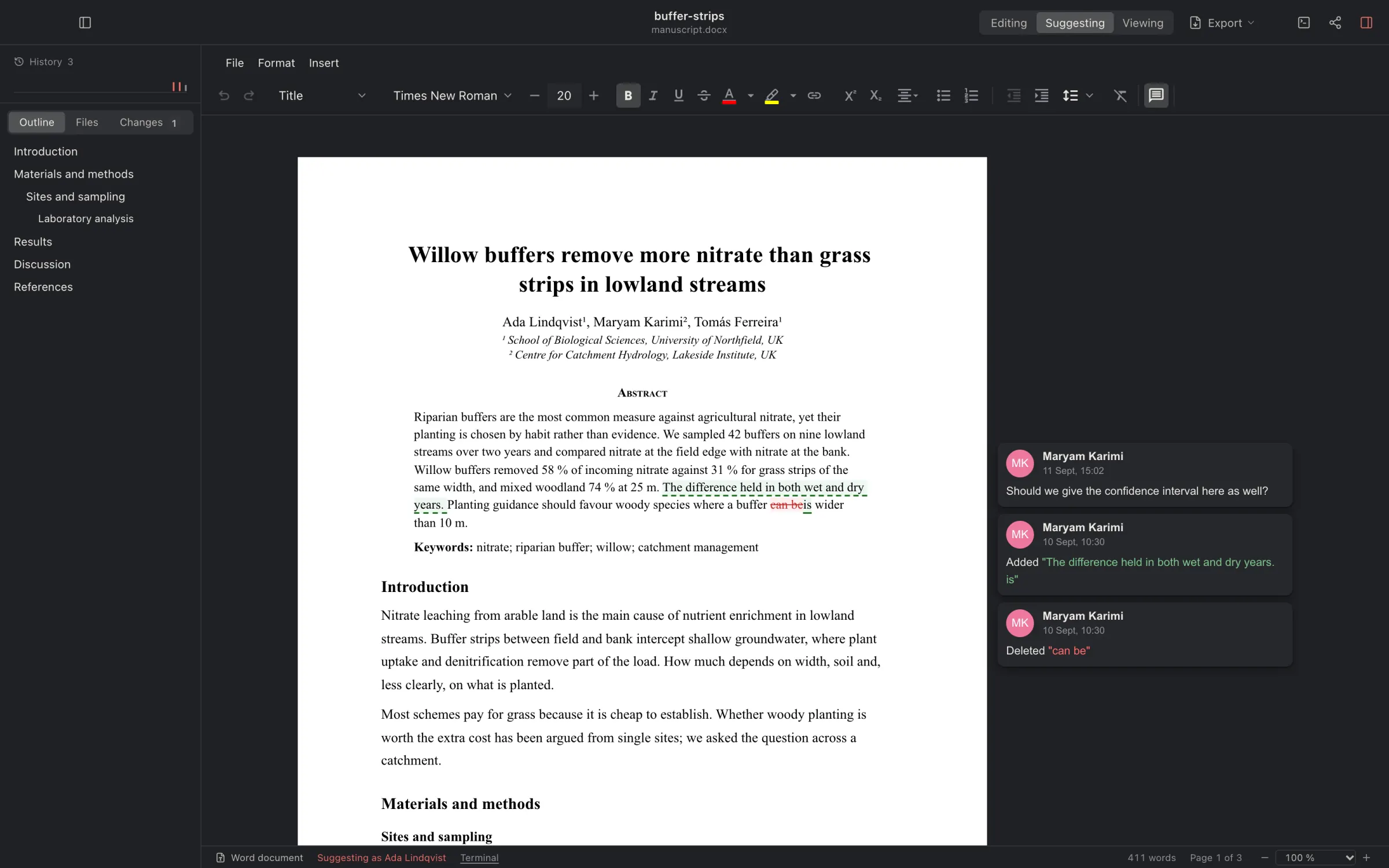
Word documents, as Word.
A .docx opens as pages, with its own styles, tables, footnotes and comments. In Suggesting, your edits become tracked changes under your name, which a coauthor in Word accepts or rejects there; theirs show beside the page. Saving rewrites only the paragraphs you changed.
LaTeX, with the engine bundled, and Typst have their own views. A Word draft from a coauthor can also become a new LaTeX paper, with its figures, tables, equations and Zotero citations brought across.
Coauthors, from anywhere.
Share a link and a coauthor on another network, or another continent, is editing with you in seconds. The paper travels from machine to machine, peer to peer, encrypted with the key in the link; Dabir's meeting point only introduces the two, and a lab can run its own.
- See each otherCarets and selections in each person's colour, in Visual and Source. Click a face to jump to them, or follow along.
- Invite as you already talkThe invitation opens in Mail, Messages, WhatsApp or Telegram, written for you. A
dabir://link opens the paper. - Your repository's peopleCollaborators on the paper's GitHub repository show under People with their roles. Dabir has no accounts of its own.
- Comments stay with the paperThey anchor to the text, carry replies and show as pins on the PDF.
Score Anchoring: Consistent Guidance for Diffusion Posterior Sampling
Aurelio Vantreight, Ilse Marrowfield, Teodor Quenzel
Abstract
Diffusion posterior sampling drifts when the guidance gradient and the learned score disagree at low noise levels. We introduce score anchoringTeodor, a single scalar correction that keeps the guided trajectory within a trust region of the prior scoreIlse. On sparse-view CT it holds a 1.8 dB margin up to σ = 0.3.
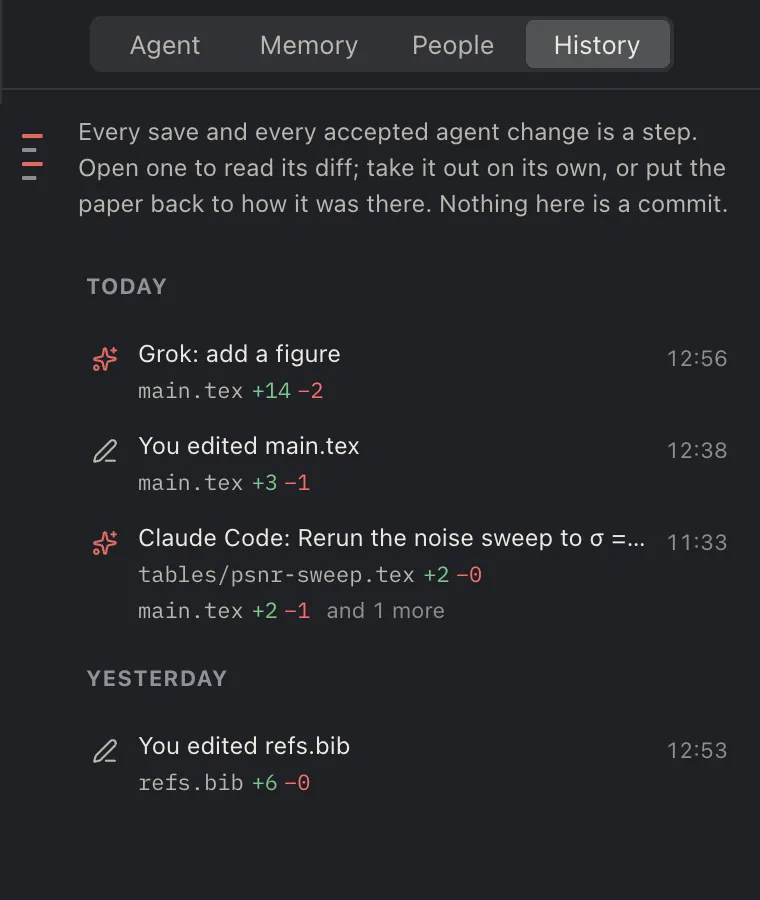
Every save is a step you can go back to.
Dabir saves as you pause. Each save and each accepted agent change becomes a step on the history rail at the top of the sidebar: scrub along it, open a step to read its diff, take one change out on its own, or put the paper back as it was.
Steps are kept apart from your Git branch. When the paper is ready, commit from Changes, the sidebar's third view, beside Outline and Files. Clone a paper from GitHub, let an agent open a pull request; git log shows the same history, and Overleaf's Git bridge works too.
The code, the notebooks and a terminal, in the same window.
- CodePython, Julia, R, MATLAB, C++ and more open in the same editor, with Run, a REPL, formatting and diagnostics from the language server.
- NotebooksJupyter notebooks open as pages with their saved outputs, tables and figures. A cell can be sent to the terminal to run.
- TerminalA real shell in the paper's folder, with the same
PATHthe agents get. Name a remote machine and commands run there over ssh. - Compile errorsErrors and warnings read as plain sentences, each pointing at its file and line, with Fix with agent beside them.
- ReferencesZotero through Better BibTeX, entries by DOI or arXiv id, and a check of every entry against Crossref, arXiv and OpenAlex.
Propose, review, keep.
- Ask
Type the change and choose the model and how hard it thinks. The agent starts in a worktree of its own with the paper's brief, the memory notes, and the passages that matter for the request.
- Watch
Its reasoning folds away, its words appear in full, and every file it reads, runs or edits shows as a row with the time. It compiles before it finishes.
- Decide
The result is a diff. Accept lands it and records a step; Accept and Commit, or open a pull request. Reject leaves nothing behind.
Free, on three platforms.
Updates arrive inside the app. The first launch opens Setup, which checks your machine and fetches only what you choose: LaTeX packages, Typst, the agent's own command-line tool.
Linux packages: .deb and .rpm. Every release, with its notes, is on GitHub.
The Windows installer is not code-signed, so Windows asks first: choose More info, then Run anyway. Or build it yourself from git clone https://github.com/surenalab/dabir.
- LicenceAGPL-3.0: read it, fork it, run it. The names and marks are covered by a trademark policy; the
.dabirformats are open. - PrivacyNothing leaves your disk unless you send it. No accounts, no telemetry. Agents run through their vendors' own command-line tools on your subscriptions; grammar checking stays off until you name a server, because text would leave the machine.
- FormatsLaTeX with the engine bundled, Typst, and Word. Export the PDF, a source zip for arXiv, or Word and HTML through pandoc; import an Overleaf zip or a Word draft.
- MemoryA
.dabirfolder next to the paper holds a brief, one-fact notes and skills, committed with the paper, so every coauthor's agent starts from the same knowledge. - SourcePublic at github.com/surenalab/dabir, with the user guide and the changelog. Issues and pull requests are read and answered.
- NameDabir, دبیر, is Persian for scribe.